
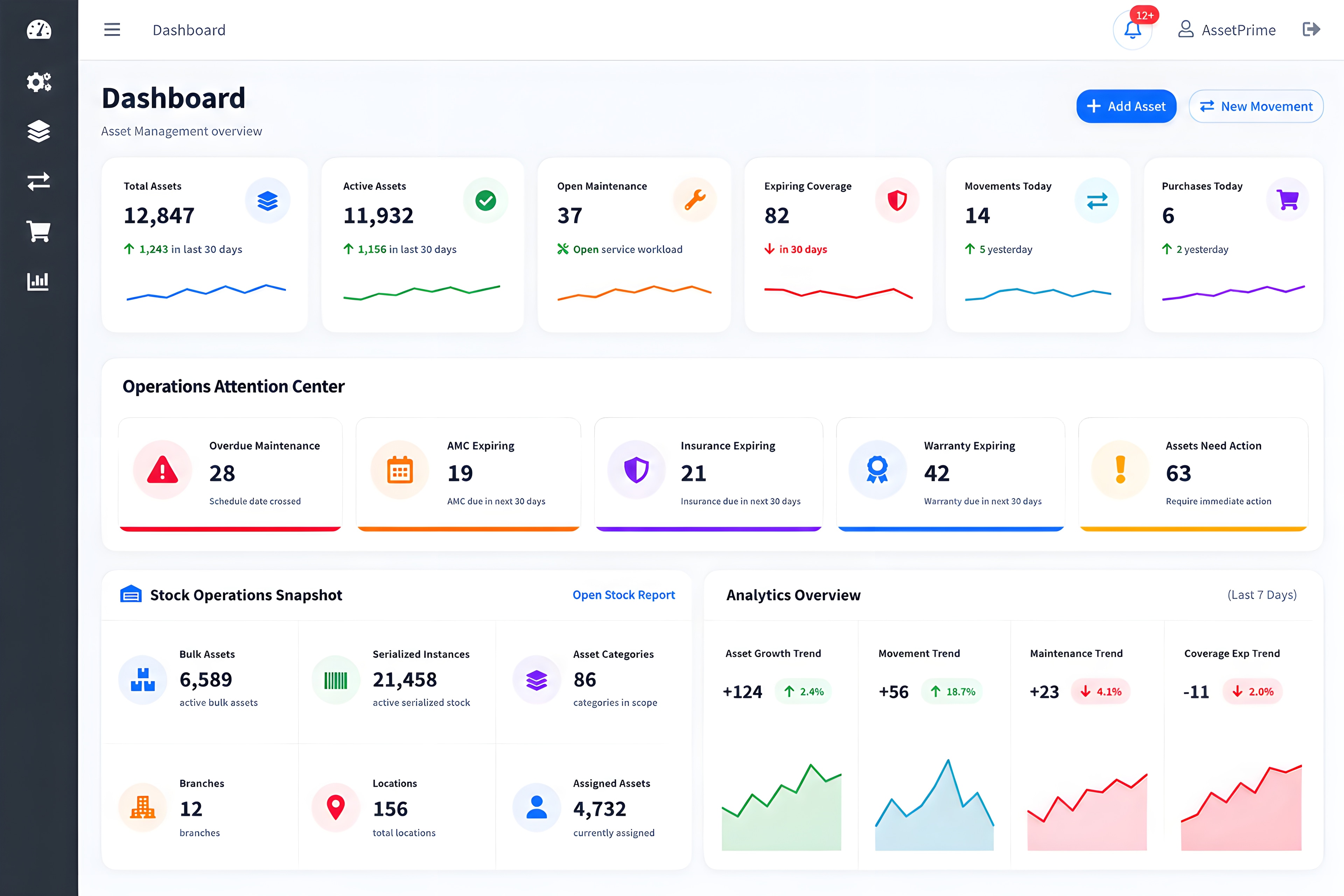
Management dashboard
Shows asset KPIs, maintenance alerts, stock activity, recent movements and operational shortcuts in the current AssetPrime interface.
Explore this workflow →AssetPrime connects procurement, receiving, registration, stock, assignment, location, movement, maintenance, coverage, depreciation, audits, reporting and disposal history in one asset management platform.
Quick Summary
Quick Answer
AssetPrime is asset lifecycle management software for organizations that need a structured asset register, clear responsibility, controlled movement, connected maintenance and coverage records, depreciation context, physical verification and operational reporting across one or multiple locations.
Who It Is For
AssetPrime supports operational, maintenance, finance, IT and management teams working with assets across departments and locations.
For teams that need a reliable register for machinery, equipment, tools, IT devices, furniture, facilities and other physical assets.
For organizations managing assets across branches, plants, hospitals, warehouses, departments, rooms, stores and service locations.
For teams coordinating assignment, movement, repairs, service history, warranty, AMC, insurance and physical verification.
For authorized users who need depreciation context, lifecycle status, audit history and structured management reports.
Overview
Asset management software is a digital system for managing physical assets across their full lifecycle — from purchase and registration to assignment, movement, maintenance, audit, and disposal.
Instead of maintaining multiple spreadsheets, teams can use one platform to track asset code, category, current location, assigned user, condition, documents, maintenance history, and movement activity. AssetPrime is built for businesses that need better visibility and control across locations.
Why It Matters
Growing businesses need more than a static spreadsheet. They need visibility, accountability, and reliable asset data.
Teams waste time searching for assets because records do not clearly show where assets are located or who is responsible.
Spreadsheets become difficult to maintain when assets move across branches, rooms, users, departments, or service centers.
Physical verification becomes slow when asset records, locations, conditions, and movement history are incomplete.
AMC, warranty, insurance, repair, and service follow-up become harder to control without structured reminders and records.
Core Features
A strong asset management system should support the daily workflows your team uses to track, move, verify, maintain, and report assets.
Connect vendors, purchase information, receiving and stock records with asset registration.
Manage assets from purchase and registration to usage, maintenance, transfer, and disposal.
Use asset codes and barcode-ready records to identify, verify, and manage assets faster.
Track assets across branches, departments, rooms, stores, users, and service locations.
Record transfers, service movements, returns, disposals, and movement history with accountability.
Track maintenance, warranty, AMC, insurance, repair, and service schedules in one place.
Review registers, stock, movement, assignment, maintenance, coverage, depreciation, disposal and audit activity.
Keep depreciation information connected with the wider asset record and lifecycle history.
Control user access through roles and location-scoped permissions while preserving activity history.
Complete Lifecycle
Keep operational, service, financial and audit history connected to the same asset instead of splitting each stage across unrelated records.
Record vendor and purchase context before equipment enters operational use.
Explore workflow →Receive stock, create structured asset records and connect documents and identifiers.
Explore workflow →Connect assets with locations, departments, employees, custodians or operating teams.
Explore workflow →Preserve transfer history and support barcode-assisted physical verification.
Explore workflow →Track service work, repairs, warranty, AMC, insurance, costs and supporting files.
Explore workflow →Maintain financial context and lifecycle history through retirement or disposal.
Explore workflow →Excel vs Software
Excel can work for a small asset list. But when assets move across locations, users, departments, and service centers, software gives better control.
Compare Excel vs Software →| Area | Manual / Excel | AssetPrime |
|---|---|---|
| Asset register | Excel sheets and manual records | Centralized searchable asset register |
| Asset location | Often outdated or unclear | Location-wise visibility across branches and departments |
| Movement history | Manual updates with weak tracking | Traceable movement history and accountability |
| Audit readiness | Slow verification and manual reports | Structured reports for faster audits |
| Maintenance | Dates and records can be missed | AMC, warranty, insurance, and service tracking |
Use Cases
AssetPrime supports teams that manage physical assets across facilities, departments, branches, and operational locations.
Track biomedical equipment, IT assets, furniture, and facility assets across departments and rooms.
Manage office assets, devices, furniture, and equipment across teams, users, and branches.
Control tools, machinery, equipment, maintenance records, and asset usage across facilities.
Track operational assets across warehouses, storage areas, movement points, and teams.
Deployment Options
Select the deployment model that matches your infrastructure ownership and operational preference.
Deploy AssetPrime on infrastructure controlled by your organization. Your team manages the hosting environment, access, backups and infrastructure operations.
Choose an optional managed cloud deployment when you prefer AssetPrime to manage the application hosting environment.
Licensing & Quotation
AssetPrime does not publish fixed country-wise prices. Commercial information is shared directly after the required scope is understood.
Product Tour
From management dashboards to detailed asset intelligence, AssetPrime is designed to make complex asset operations easier to understand and control.
Shows asset KPIs, maintenance alerts, stock activity, recent movements and operational shortcuts in the current AssetPrime interface.
Explore this workflow →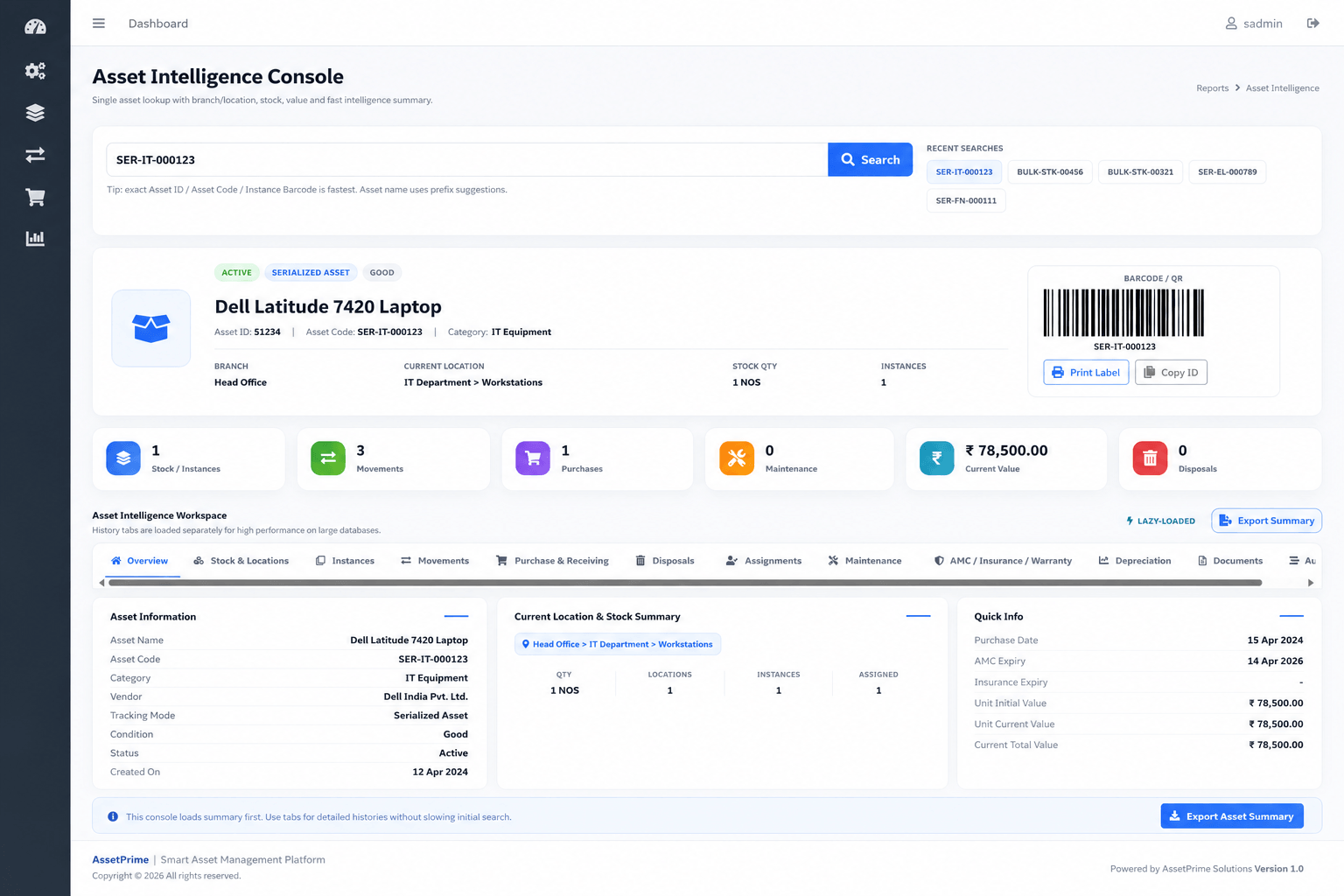
Brings an asset's stock, movement, purchase, assignment, maintenance, coverage, depreciation and document history into one connected view.
Explore this workflow →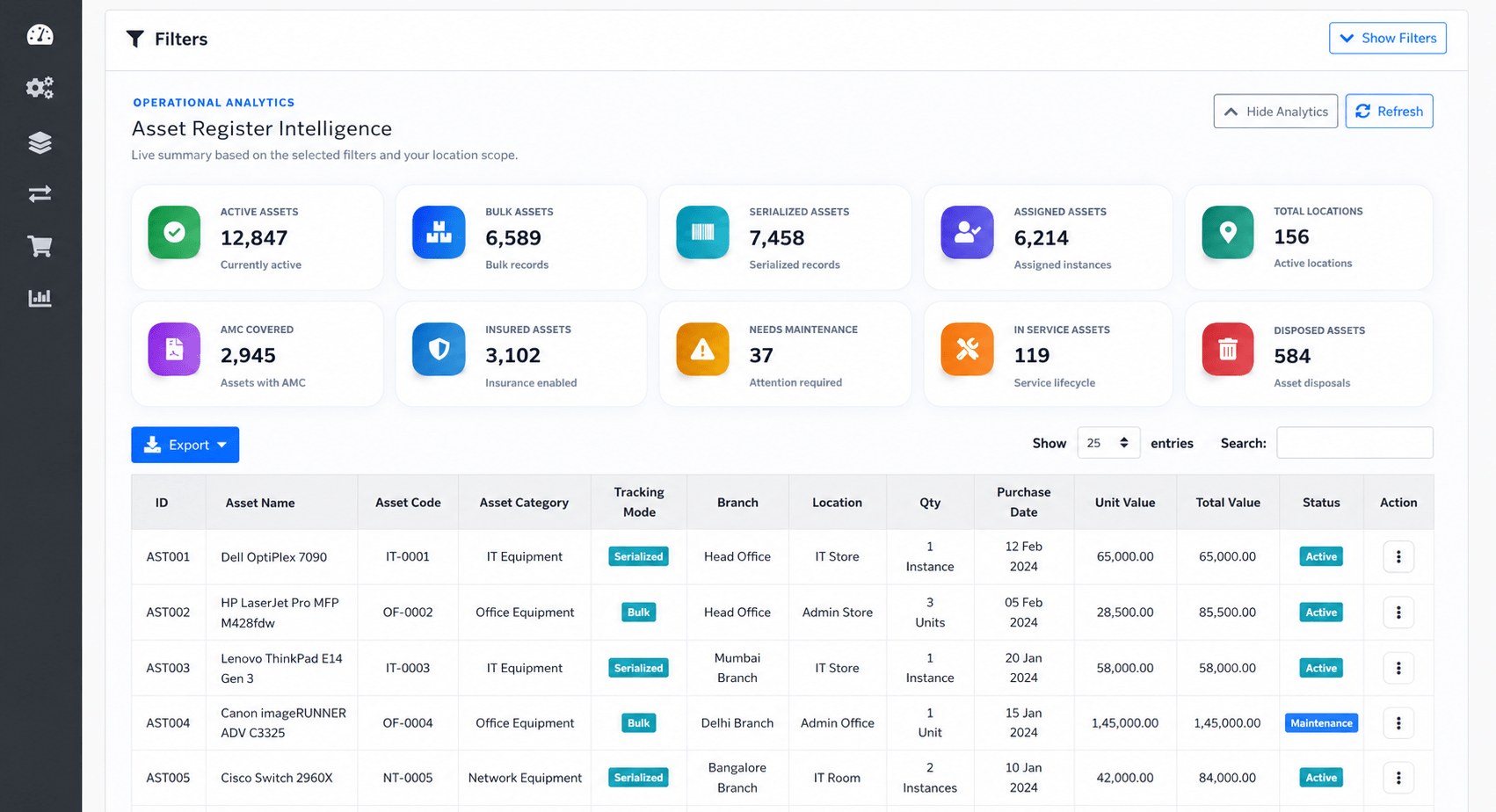
Demonstrates searchable, filterable and export-ready asset records with lifecycle, location, condition and value context.
Explore this workflow →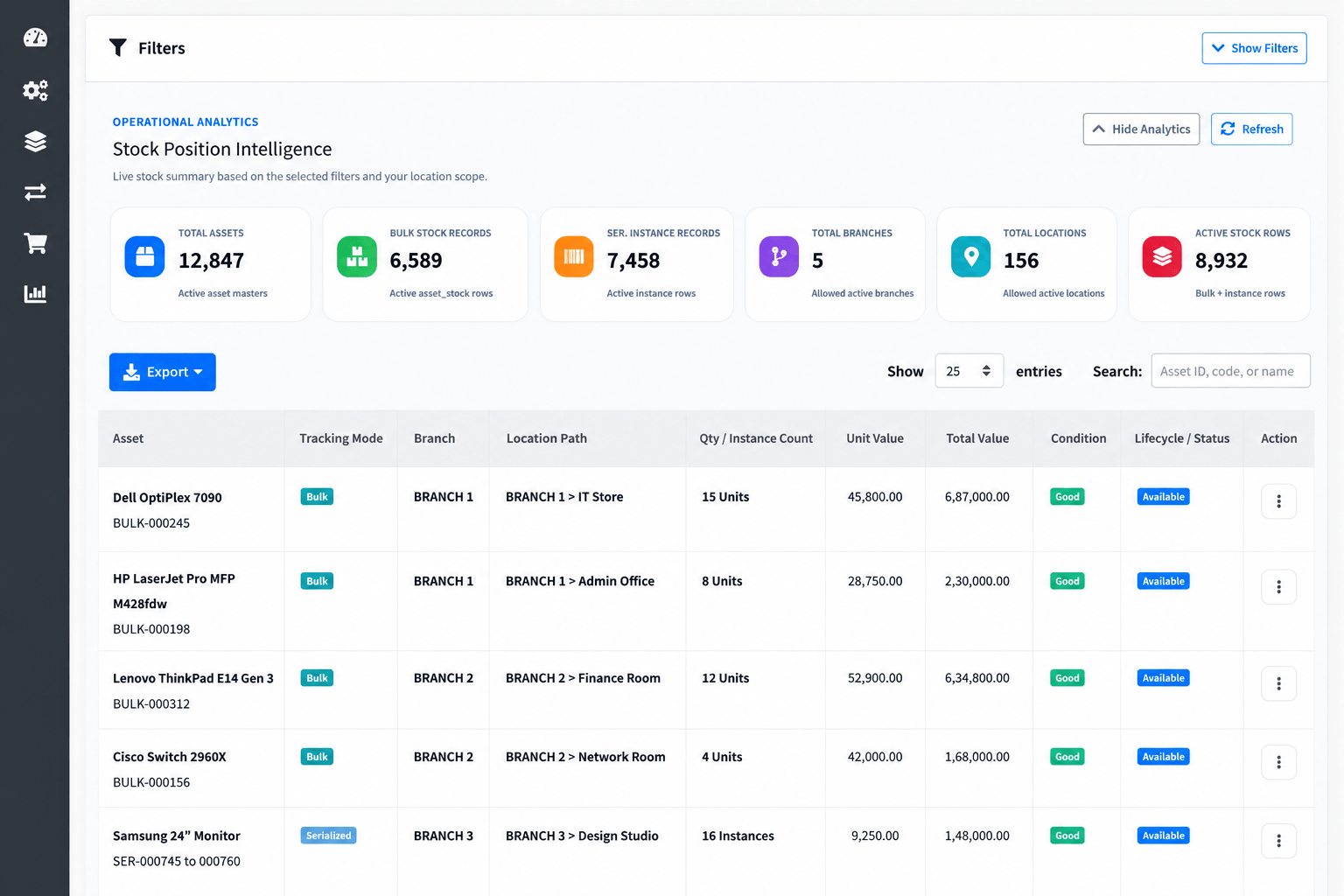
Demonstrates branch-wise and location-wise visibility for quantity-based stock and serialized asset instances.
Explore this workflow →Access & Accountability
AssetPrime combines access controls with connected operational history. Exact infrastructure and data-management responsibilities depend on the selected deployment model.
Explore role-based access →Role-based access for different responsibilities
Location-scoped permissions for authorized users
User activity information and traceable asset history
Deployment choice and organizational control over the hosting model
Review asset registers, stock, assignments, movements, maintenance, warranty, AMC, insurance, procurement, depreciation, disposal and audit activity.
Explore reporting →Demo to Quotation
The demonstration and quotation process is tailored to your actual asset-management scope without publishing generic or country-specific prices.
Tell us about your organization, asset volume, users, locations and priority workflows.
See relevant AssetPrime workflows in a remote product demonstration.
Discuss self-hosted or optional AssetPrime-managed cloud deployment.
Receive commercial information directly based on the agreed scope and requirements.
Decision Resources
These resources help you compare options, understand cost, build a better asset register, and avoid common asset tracking mistakes.
Understand the ideal asset register columns and sample structure.
Compare spreadsheets with dedicated asset management software.
Learn what affects asset tracking software cost and pricing.
Learn how to manage assets across branches, departments, and rooms.
See the common reasons businesses lose asset visibility and control.
Compare what matters when choosing asset software in India.
Pricing depends on asset count, users, locations, barcode tracking, movement, audits, maintenance, and reporting needs.
View Pricing Guide →Frequently Asked Questions
Book a Demo
Share your asset count, locations, users, and tracking needs. Get a walkthrough of AssetPrime for asset register, movement, barcode tracking, maintenance, audits, and reports.