
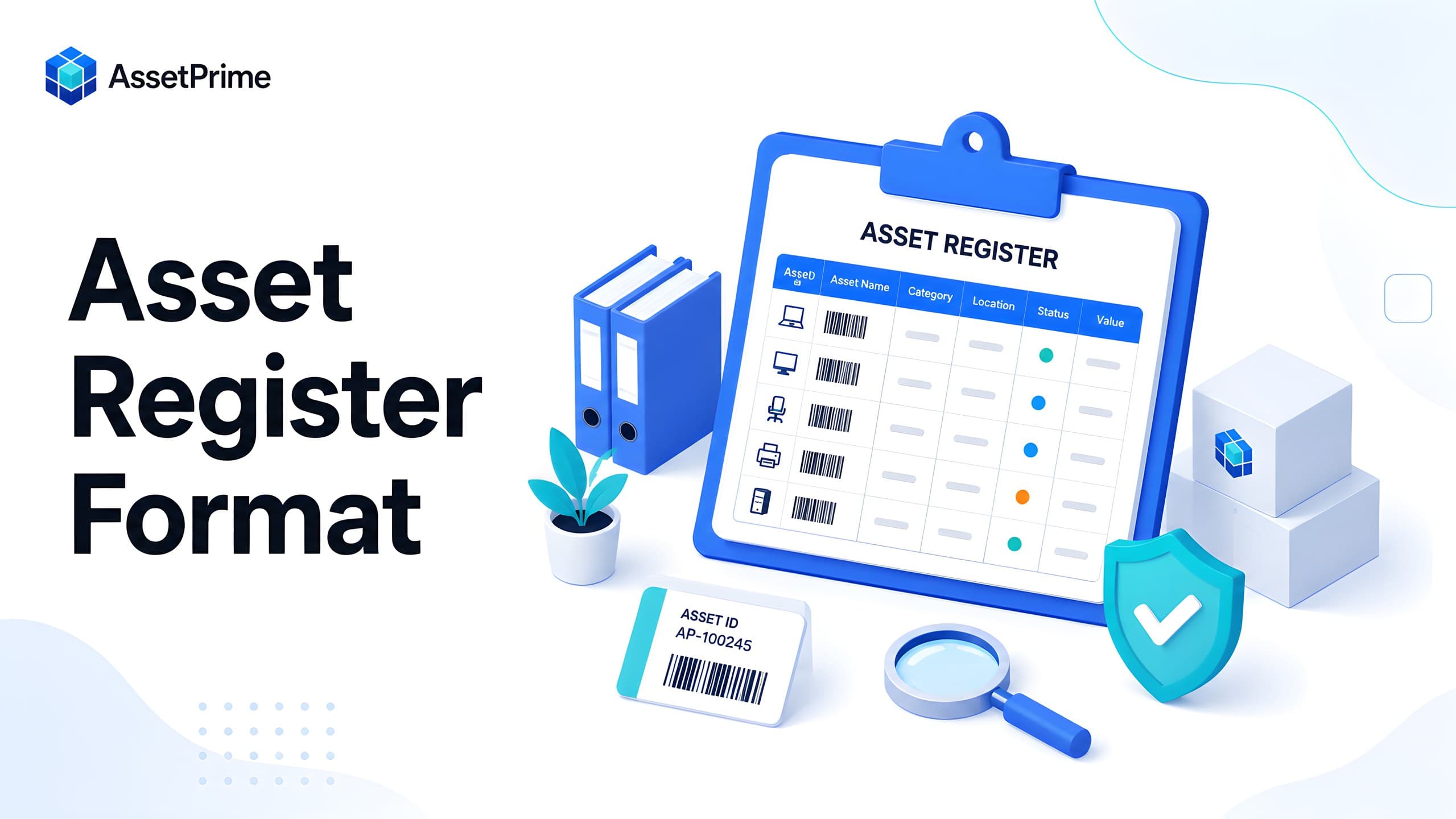
What is an asset register?
An asset register is the organization’s controlled record of the physical and financial assets it owns, leases, operates, safeguards, or is responsible for maintaining. It answers basic questions such as what assets exist, where they are, who has custody, what condition they are in, and what stage of the lifecycle they have reached.
A simple register may contain an asset code, asset name, category, purchase date, cost, location, and status. A reliable modern register connects those identity fields to procurement, stock, assignment, movement, maintenance, warranty, AMC, insurance, depreciation, documents, audit history, and disposal records.
The register becomes the foundation for operational decisions, financial reporting, audits, insurance reviews, maintenance planning, and replacement budgeting. When the register is incomplete, duplicated, or outdated, every report built on it becomes less trustworthy.
For that reason, an asset register should be treated as a governed system of record rather than a static spreadsheet maintained only before an audit. For a ready-to-use column structure, example rows, and an Excel-ready download, use AssetPrime’s dedicated Asset Register Format resource.
Need the spreadsheet structure?
Use the free asset register format and CSV template
This article focuses on building, governing, verifying, and maintaining a reliable register. For the complete column list, sample rows, and downloadable CSV file, use the dedicated template resource.
View the asset register format and download the template →“You cannot control assets clearly when ownership, location, maintenance, and audit history live in separate files.”
Why the asset register format matters
The format determines whether asset data is consistent enough to search, compare, report, and verify. Without a common structure, one department may record “Dell Laptop,” another may use “Notebook Computer,” and a third may enter only a model number. The assets may be similar, but the data cannot be analyzed reliably.
A good format defines which fields are mandatory, how asset codes are generated, how categories and locations are named, how dates are stored, and which values are selected from controlled lists. This reduces spelling differences, missing information, and duplicate records.
The format also determines whether the register can support the full lifecycle. A list designed only for purchase details will not adequately support transfers, employee assignments, maintenance, coverage renewals, depreciation, or disposal.
The best asset register format therefore combines standard master data with linked transaction history. It stores the current state clearly while preserving the events that produced that state.
What strong asset control should make visible
- ✓Where each asset is located today.
- ✓Who is responsible for the asset.
- ✓When it was purchased, moved, maintained, or disposed.
- ✓Which records are ready for audit, reporting, and decision-making.
The three layers of a complete asset register
A complete asset register can be understood in three layers: identity, current operational state, and lifecycle history. Identity describes what the asset is. The current state describes where it is and who controls it now. Lifecycle history explains how it reached that state.
The identity layer includes asset code, name, category, make, model, serial number, barcode, specifications, and ownership type. These fields should remain relatively stable throughout the asset’s life.
The current-state layer includes branch, location, department, assigned employee, quantity, condition, operational status, and coverage status. These values change as assets move or responsibilities change.
The history layer includes purchase, receipt, transfers, assignments, maintenance, audits, depreciation, renewals, disposal, and user activity. This history is essential when management or auditors need evidence rather than only the latest value.
Essential asset identification fields
Every asset should have a unique asset code that remains unchanged even if the asset moves between branches or departments. The code should not depend entirely on the current location because location can change many times.
The register should include a clear asset name, standardized category and subcategory, manufacturer, model, serial number where applicable, barcode or QR identifier, and a short specification or description. Photographs may also help distinguish similar assets.
Serial numbers identify manufacturer-specific units, while internal asset codes identify assets within the organization. Both should be recorded because a serial number may be missing, unreadable, duplicated in poor source data, or formatted differently by different suppliers.
For bulk assets that are not managed individually, the register may store a stock record with quantity and location. For serialized assets, every physical unit should have its own asset instance, serial number, barcode, condition, and lifecycle status.
Location, ownership, and custody fields
An accurate register must show where an asset is currently held and who is accountable for it. This usually requires separate fields for branch, building, floor, room, department, cost center, and assigned employee or custodian.
Location and custody should not be merged into one free-text field. An asset may be located in a server room while being owned by the IT department and assigned to a specific administrator. Each relationship answers a different control question.
The register should distinguish permanent ownership, temporary custody, service-provider custody, and storage. It should also record assignment dates, expected return dates where relevant, and returned status.
For multi-branch organizations, hierarchical locations are especially useful. They allow reporting at company, branch, building, floor, room, or department level without duplicating location names in inconsistent forms.
Procurement and financial fields
The procurement section should capture supplier, purchase order, invoice number, purchase date, receipt date, quantity, unit cost, taxes where relevant, total acquisition cost, and funding or cost-center information.
Organizations may also need ownership type, lease details, capitalization status, useful life, residual value, depreciation method, depreciation start date, accumulated depreciation, and current book value.
Purchase price alone may not represent the complete acquisition cost. Freight, installation, customs duty, configuration, and other directly attributable expenses may need to be included according to the organization’s accounting policy.
Operational and accounting teams should agree on field definitions. This prevents a situation in which the physical asset register and the fixed asset ledger contain conflicting values or different asset groupings.
Status, condition, and lifecycle fields
Status and condition are related but should be stored separately. Status describes the lifecycle or operational state, such as in stock, active, assigned, under maintenance, service out, retired, lost, or disposed. Condition describes physical quality, such as new, good, fair, damaged, or unusable.
Keeping these fields separate makes reporting more meaningful. An asset can be active but in fair condition, under maintenance but repairable, or retired while still physically present in storage.
The register should also record activation date, last verification date, retirement date, disposal date, disposal method, scrap or sale value, and profit or loss on disposal where relevant.
Consistent lifecycle states prevent assets from disappearing from reports prematurely. Disposal should be a controlled transaction with approval and history rather than simply deleting the row.
Warranty, AMC, insurance, and compliance fields
Coverage information should include warranty provider, warranty start and expiry dates, AMC vendor, AMC contract number, AMC expiry, insurance provider, policy number, insured value, policy expiry, and relevant documents.
Expiry dates are useful only when they can trigger reports or reminders. A register that stores coverage dates but never surfaces upcoming renewals still leaves the organization exposed to missed support, uninsured equipment, or avoidable repair costs.
Compliance fields may include calibration due date, inspection date, certification status, regulatory category, safety classification, and required document references. These fields are especially important in hospitals, laboratories, factories, and regulated facilities.
Coverage should be linked to the correct asset or asset instance. Applying one generic warranty date to several units purchased at different times can create inaccurate renewal and claim records.
Maintenance and service fields
A modern asset register should show whether an asset requires preventive maintenance, its maintenance frequency, next due date, last service date, maintenance state, service provider, downtime, and cumulative maintenance cost.
The full maintenance history should remain linked to the asset instead of being overwritten by the latest service entry. This helps teams identify repeated failures, high-cost assets, missed schedules, and candidates for replacement.
When an asset leaves the premises for repair, the register should record service-out movement, destination vendor, dispatch date, expected return, actual return, condition, and any parts or costs involved.
Connecting maintenance with the asset register gives management a more complete view of total cost of ownership instead of considering purchase cost alone.
Asset register format for serialized and bulk assets
Not every asset should be tracked in exactly the same way. Serialized tracking is appropriate for laptops, vehicles, medical devices, machinery, tools, and other units that require individual identity and history.
Bulk tracking is suitable for homogeneous items where the organization primarily needs quantity by location, such as chairs, bins, low-value accessories, or consumable-like operational assets. The register stores total quantity, available quantity, and location-level stock instead of creating an individual record for every unit.
A hybrid register supports both approaches. It can show a common asset master while maintaining quantity records for bulk stock and separate instances for serialized units.
This prevents the register from becoming unnecessarily large while still providing unit-level control where accountability, warranty, assignment, maintenance, or audit requirements demand it.
Example fixed asset register format
A practical fixed asset register can be organized into grouped columns instead of one long unstructured sheet. Group 1 covers identity: asset code, asset name, category, make, model, serial number, and barcode. Group 2 covers organization: branch, location, department, custodian, and cost center.
Group 3 covers procurement and finance: supplier, PO number, invoice number, purchase date, receipt date, cost, capitalization date, useful life, depreciation method, residual value, and book value.
Group 4 covers operations: status, condition, assignment, maintenance due date, last audit date, warranty expiry, AMC expiry, insurance expiry, and document links. Group 5 covers exit: retirement date, disposal method, buyer or scrap vendor, disposal value, and approval reference.
This grouped approach is easier to understand, but access should be role-based. A maintenance user may not need to edit depreciation, while finance users may not need to change physical location without an approved movement.
Asset register in Excel: where it works and where it fails
Excel can be useful for establishing an initial asset list, importing historical records, performing one-time analysis, or managing a very small and stable asset base. It is familiar, flexible, and easy to start.
Problems emerge when many users edit the file, assets move frequently, records require approvals, or the organization operates across locations. Version conflicts, overwritten values, free-text inconsistencies, hidden formulas, broken links, and unclear ownership become common.
A spreadsheet typically shows the latest typed value but not a reliable transaction trail. It may say that an asset is in Branch B without showing who transferred it, when it moved, where it came from, or whether it was received.
Excel remains valuable for exports and analysis, but asset management software is better suited to act as the primary system of record when lifecycle control, auditability, and multi-user operations matter.
How to build an asset register from existing data
Start by collecting records from finance, procurement, IT, facilities, maintenance, warehouses, department spreadsheets, and previous audit files. Do not assume that one source is complete.
Define the target data model before cleaning the information. Establish mandatory fields, category names, location hierarchy, status values, ownership rules, and the distinction between bulk and serialized assets.
Clean duplicates, normalize names and dates, map old codes, identify missing serial numbers, and flag uncertain records. Importing bad data quickly does not create a reliable register; it only centralizes existing errors.
After import, perform physical verification. Tag assets, confirm locations and custodians, record condition, resolve exceptions, and approve the baseline. The verified baseline should then be protected through controlled transactions rather than direct uncontrolled editing.
Data governance and control rules
An asset register remains accurate only when responsibility is clear. Define who can create assets, approve purchases, receive stock, transfer assets, assign them, complete maintenance, update financial values, and authorize disposal.
Use mandatory fields, controlled dropdowns, duplicate checks, validation rules, role-based permissions, and audit logs. Important changes should record the user, timestamp, old value, new value, and business reason where appropriate.
Avoid giving every user unrestricted edit access. Directly changing an asset’s location may bypass movement history, while deleting an asset may remove evidence needed for audits and financial reconciliation.
Periodic data-quality reports should identify missing barcodes, duplicate serial numbers, assets without locations, expired coverage, overdue maintenance, unverified assets, and records that have not changed for an unusually long period.
How asset registers support audits
An audit-ready register provides a defined population of assets, unique identifiers, expected locations, responsible custodians, current status, previous verification date, and linked evidence.
During physical verification, auditors or internal teams can scan the asset barcode, compare the observed asset with the record, confirm location and condition, and record exceptions immediately.
The system should distinguish assets found as expected, found in a different location, assigned to a different user, damaged, missing, duplicated, untagged, or present physically but absent from the register.
After the audit, adjustments should follow approval rules. The audit outcome, evidence, reviewer, timestamps, and corrective actions should remain part of the permanent history.
Common asset register mistakes
Common mistakes include using asset names as unique identifiers, storing several different values in one field, depending on free-text locations, mixing status with condition, and recording only purchase data.
Other frequent issues are duplicate serial numbers, inconsistent dates, missing custodians, generic categories, old employees remaining assigned, deleted disposal records, and expired warranty or insurance details that are never reviewed.
Organizations also create problems by tracking every low-value bulk item individually or, in the opposite direction, grouping high-value serialized equipment into one quantity row. The tracking method should match the risk and operational need.
The most serious mistake is treating the register as a periodic reporting exercise. Accuracy must be maintained continuously through procurement, receiving, movement, assignment, service, return, audit, and disposal workflows.
Best practices for a reliable digital asset register
Use permanent unique asset codes, standardized categories, hierarchical locations, and separate records for each serialized unit. Apply barcode labels at receiving or during baseline verification.
Record changes through controlled workflows. A transfer should update location through a movement transaction; an assignment should create custody history; maintenance should create a service record; disposal should close the lifecycle without deleting evidence.
Schedule regular exception reviews and risk-based physical audits. High-value, portable, regulated, or frequently moved assets may need more frequent verification than fixed low-risk equipment.
Keep the register useful for operational teams. When the system supports receiving, stock, assignments, maintenance, coverage, audits, and reports, users have a reason to maintain the data every day rather than only before year-end.
How AssetPrime supports a modern asset register
AssetPrime provides a centralized asset register for serialized and bulk assets across branches, departments, and hierarchical locations. Each asset can be connected to barcode identification, procurement, stock, assignments, movements, maintenance, warranty, AMC, insurance, depreciation, documents, and disposal.
Role-based and location-based access controls help ensure users see and manage only the assets relevant to their responsibilities. Transaction history and audit records improve accountability when assets move or values change.
Operational dashboards and reports help teams identify open maintenance, expiring coverage, assigned assets, location-level stock, movements, procurement activity, disposal results, and records requiring attention.
The result is not simply a digital list. It is a lifecycle-aware system of record that supports operations, finance, compliance, and management from acquisition through retirement.
Final thoughts
The best asset register format is one that combines clear identity, accurate current status, and complete lifecycle history. It should support both operational control and financial accountability without forcing every asset into the same tracking method.
A spreadsheet template can help an organization begin, but long-term reliability depends on governance, verification, controlled transactions, and ownership of the data.
By building a structured digital asset register and maintaining it through daily workflows, organizations can reduce missing assets, improve audits, plan maintenance, control coverage, and make better replacement and investment decisions.
Related AssetPrime Pages
Continue with related pages
Explore connected features, guides, solutions, and industry pages that support this topic.
FAQ
Frequently asked questions
What is an asset register format?
An asset register format is the standardized structure used to record asset identity, location, ownership, procurement, cost, status, condition, coverage, maintenance, depreciation, audit, and disposal information.
What fields should a fixed asset register include?
At minimum, include a unique asset code, asset name, category, serial number where applicable, barcode, branch, location, custodian, purchase date, cost, status, condition, and last verification date. Mature registers also include maintenance, warranty, AMC, insurance, depreciation, documents, and disposal history.
Can I maintain an asset register in Excel?
Yes, Excel can work for a small and stable asset base or as an import and analysis tool. It becomes difficult to control when multiple users, locations, movements, assignments, approvals, maintenance records, and audit trails are involved.
What is the difference between an asset register and a fixed asset register?
An asset register may include operational assets regardless of accounting treatment. A fixed asset register usually focuses on capitalized assets and financial details such as useful life, depreciation, residual value, and book value.
Should every physical item have an individual asset record?
No. High-value, portable, serviceable, regulated, or accountable units should usually be serialized. Homogeneous low-risk items can be tracked in bulk quantities by location when individual history is unnecessary.
How often should an asset register be updated?
It should be updated whenever an asset is purchased, received, moved, assigned, returned, serviced, insured, audited, retired, lost, or disposed. Exception and quality reviews should also be conducted monthly or quarterly.
How do barcodes improve an asset register?
Barcodes connect physical assets to digital records quickly. Scanning reduces manual entry, helps verify identity and location, and supports receiving, movement, assignment, maintenance, and physical audits.
Who is responsible for maintaining the asset register?
Responsibility is usually shared among procurement, finance, IT, facilities, stores, maintenance, and department custodians. A designated asset owner or governance team should define standards and oversee data quality.
How can an organization convert an Excel register into software?
Define the target fields and controlled values, clean duplicates and inconsistent data, classify assets as serialized or bulk, import the records, conduct physical verification, apply barcodes, resolve exceptions, and approve a verified baseline.
How does AssetPrime support asset registers?
AssetPrime supports centralized serialized and bulk asset records with barcode tracking, multi-branch locations, procurement, stock, assignments, movements, maintenance, warranty, AMC, insurance, depreciation, documents, audit trails, disposal, and reporting.
Continue Reading
Related articles
Asset Management
What Is Asset Management Software? A Complete Guide for Modern Organizations
Read Article →
Asset Tracking
Asset Tracking vs Inventory Management: Key Differences for Modern Businesses
Read Article →
Barcode Tracking
How Barcode Asset Tracking Works: A Complete Guide for Modern Asset Operations
Read Article →