
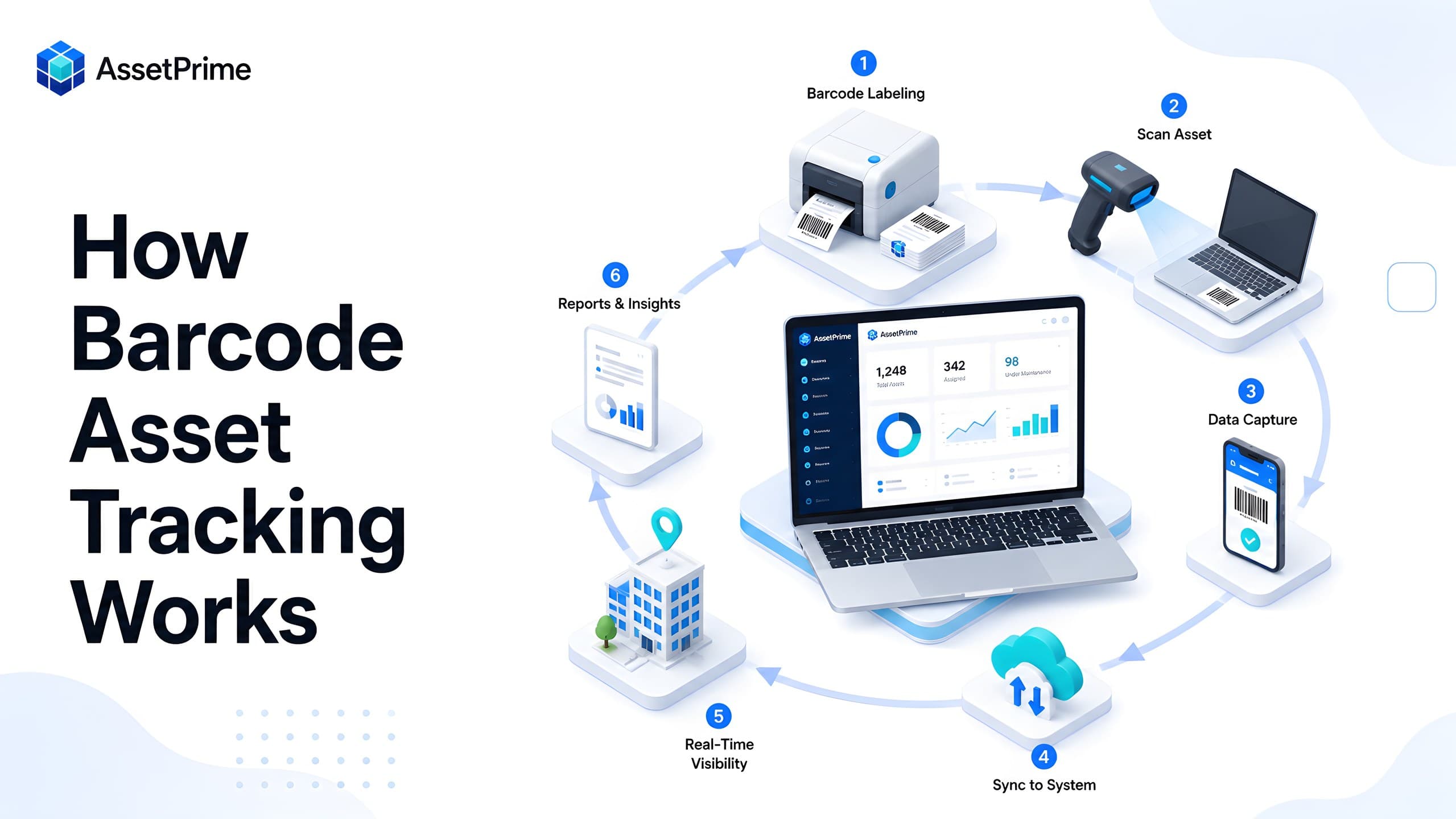
Barcode asset tracking connects every physical asset to a reliable digital record
Organizations often know that they own laptops, machinery, furniture, medical equipment, tools, vehicles, and other operational assets. The harder questions are where each asset is located, who is using it, whether it is under warranty, when it was last serviced, and whether it was physically verified during the latest audit.
Barcode asset tracking solves this visibility problem by assigning a machine-readable identity to each trackable asset. A barcode or QR code label is attached to the physical item and linked to a structured record in asset management software. Scanning that label opens the correct record and allows an authorized user to verify or update the asset without manually searching through spreadsheets, registers, or paper files.
The barcode is only the visible identifier. The real value comes from the connected system behind it. That system stores the asset code, category, serial number, purchase details, branch, location, department, custodian, condition, warranty, maintenance history, movements, audit status, depreciation, documents, and disposal information.
A well-designed barcode workflow therefore does much more than identify equipment. It creates a dependable link between the physical asset and its complete digital lifecycle, helping organizations improve control, accountability, audit readiness, and operational speed.
“You cannot control assets clearly when ownership, location, maintenance, and audit history live in separate files.”
What is barcode asset tracking?
Barcode asset tracking is the process of assigning a unique barcode or QR code to a physical asset and linking that code to its record in an asset management system. When the label is scanned, the software retrieves the associated information and can record an action such as verification, assignment, transfer, maintenance, return, or disposal.
The code printed on the label usually contains a unique asset identifier rather than every detail about the asset. The full information remains securely stored in the software. This keeps labels simple while allowing the underlying record to grow throughout the asset's useful life.
For example, a laptop may carry the code AP-IT-004582. Scanning the label can display its serial number, model, purchase date, assigned employee, current office, warranty expiry, condition, maintenance history, and previous movements. The same principle can be applied to medical devices, production machines, tools, furniture, networking equipment, vehicles, and other controlled items.
Barcode tracking is commonly used for fixed assets, movable assets, serialized equipment, returnable tools, maintenance-intensive equipment, and selected bulk stock. Its effectiveness depends on clear identification rules, durable labels, disciplined scanning, accurate software records, and properly defined workflows.
What strong asset control should make visible
- ✓Where each asset is located today.
- ✓Who is responsible for the asset.
- ✓When it was purchased, moved, maintained, or disposed.
- ✓Which records are ready for audit, reporting, and decision-making.
Why organizations move from manual registers to barcode tracking
Manual asset registers can document ownership, but they do not make physical verification easy. Teams must read serial numbers, search rows, compare locations, and update files manually. This becomes slow and error-prone when assets are distributed across branches, departments, rooms, warehouses, campuses, or customer sites.
Barcode scanning reduces the effort required to identify an asset. Instead of typing a long serial number or searching by description, the user scans the attached label. This lowers the risk of selecting the wrong record, speeds up routine operations, and improves consistency across teams.
The benefit becomes especially visible during audits and movements. An audit team can scan assets room by room and immediately compare the physical item with the expected location in the system. A transfer team can scan the asset, select the destination, and create a traceable movement record. A maintenance technician can scan equipment before recording a service activity.
Barcode tracking also strengthens accountability. When every important action is connected to the correct asset and recorded with a date, user, location, and status, management gains a clearer picture of how assets are being used and controlled.
How barcode asset tracking works step by step
The first step is asset registration. The organization creates a structured record containing the asset name, unique code, category, serial number, purchase information, branch, location, department, condition, ownership status, and other relevant details. The accuracy of this master record is important because the barcode will point users back to it throughout the asset lifecycle.
The second step is code generation. The asset management system converts the unique asset identifier into a barcode or QR code. Label dimensions, layout, logo, text, and human-readable asset code can be configured according to the available printer and the physical size of the asset.
The third step is label printing and attachment. The label is printed on a material suitable for the operating environment and fixed to a visible but protected area of the asset. Laptops may use compact tamper-resistant labels, while machines and outdoor equipment may require stronger polyester, laminated, metal, or chemically resistant labels.
The fourth step is scanning. An authorized user scans the code using a handheld scanner, mobile device, tablet, or supported camera. The software identifies the asset and displays the relevant record or workflow.
The fifth step is transaction recording. Depending on the user's task, the scan may confirm an audit, initiate a transfer, assign the asset to an employee, record a maintenance activity, update condition, return an item, or support disposal. The system stores the action as part of the asset's history.
The final step is reporting and control. Managers use dashboards and reports to identify missing assets, movement activity, overdue maintenance, expiring coverage, unverified items, location mismatches, and other exceptions that need attention.
The core components of a barcode asset tracking system
A complete barcode asset tracking system combines several components. The first is asset management software, which acts as the central system of record. It stores asset details, controls user access, manages workflows, preserves history, and produces reports.
The second component is the coding standard. Every trackable item needs a unique and stable identifier. A good asset code should not be reused, even after an asset is disposed. Organizations may use a simple sequential format or include controlled prefixes for category, branch, or asset type, provided the structure remains manageable.
The third component is the label. Label quality should match the asset and environment. Adhesive paper may be adequate for short-term indoor use, while long-life assets may require durable synthetic or tamper-evident labels. The printed asset code should remain readable even when a scanner is temporarily unavailable.
The fourth component is the scanning device. Options include USB scanners, Bluetooth scanners, rugged handheld terminals, smartphones, and tablets. The right choice depends on scanning volume, mobility, environmental conditions, network access, and the workflows supported by the software.
The fifth component is process discipline. Barcode technology cannot correct an inaccurate register or an unrecorded transfer. Teams must scan assets consistently, update locations promptly, protect labels, and follow approval procedures for assignments, maintenance, loss, retirement, and disposal.
What information does the barcode contain?
In most enterprise implementations, the barcode contains only a unique identifier such as an asset code, internal ID, or secure lookup value. When scanned, that value is sent to the software, which retrieves the current asset record from the database.
This approach is preferable to encoding large amounts of business information directly in the label. Asset details change over time: the location may change, the assigned employee may leave, the condition may deteriorate, or the warranty may expire. Keeping these details in the software ensures the scan always shows the latest authorized information without requiring a new label for every update.
A barcode label can still display useful human-readable information around the code, such as asset name, asset code, organization name, support contact, or a warning that the item is company property. However, sensitive information should not be exposed unnecessarily on the physical label.
The label should identify the asset reliably, while the software should remain the source of truth for operational, financial, maintenance, and compliance information.
Traditional barcodes vs QR codes for asset tracking
Traditional one-dimensional barcodes use vertical lines and are typically scanned in a horizontal direction. They are compact, familiar, inexpensive to print, and work well with dedicated barcode scanners. They are often suitable for high-volume indoor operations where users scan assets at close range.
QR codes are two-dimensional and can store more data within a square pattern. They can usually be scanned from different angles with a smartphone or tablet camera, making them convenient for mobile asset operations. Their error-correction capability may also allow successful scanning when part of the code is slightly damaged.
Neither option is automatically better for every organization. Traditional barcodes may be preferred where dedicated scanners are already available and fast repetitive scanning is important. QR codes may be more practical where users rely on mobile devices or where the label must remain readable at a smaller size.
The most important consideration is compatibility with the asset management workflow. The chosen format should be supported by the software, printers, scanners, label material, and operating environment. Organizations should test real labels on representative assets before rolling out the standard across the entire register.
Serialized assets and bulk assets require different barcode strategies
Serialized assets are individually identifiable items such as laptops, servers, printers, medical devices, machines, instruments, vehicles, and high-value tools. Each unit should normally receive its own asset code and barcode because its location, assignment, condition, warranty, maintenance, and lifecycle history must be tracked independently.
Bulk assets are interchangeable quantities managed as stock, such as chairs of the same type, cables, low-value tools, spare parts, safety equipment, or consumable-like operational items. Tracking every unit individually may create unnecessary administration when the business only needs to know the quantity available at each location.
A hybrid model is often the most practical. High-value, regulated, mobile, maintenance-sensitive, or user-assigned items are serialized and labelled individually. Interchangeable stock is tracked by asset type, location, and quantity, with barcodes used for the stock item, bin, batch, or transaction where appropriate.
Choosing the wrong tracking level can make a system either too weak or too complicated. Organizations should decide whether the operational question is 'Which exact unit is this?' or 'How many units of this item are available here?' The barcode strategy should follow that answer.
Barcode tracking across the complete asset lifecycle
Barcode tracking should begin when an asset is received, not months later during an audit. At procurement or receiving, the organization can create the asset record, capture serial and purchase details, assign the initial branch and location, generate the label, and confirm that the physical item matches the purchase documentation.
During deployment, scanning can support issue and assignment workflows. The asset is linked to an employee, department, room, project, or operational unit. This provides a clear record of custody and reduces disputes about who is responsible for the item.
During use, barcode scans can record internal transfers, service-out movements, service returns, temporary loans, condition changes, and location verification. Maintenance teams can identify the correct equipment before adding work details, costs, parts, downtime, or completion notes.
During audits, scanning confirms whether the asset exists at the expected location and whether its physical condition matches the system. Exceptions such as missing, relocated, damaged, unlabelled, or duplicate items can be investigated instead of being hidden inside a manually updated spreadsheet.
At retirement or disposal, the barcode helps ensure that the correct asset is selected for approval, data clearance, sale, scrap, return, donation, or destruction. The final transaction closes the lifecycle while preserving the historical record for reporting and compliance.
How barcode scanning improves physical asset audits
Physical asset audits are one of the strongest use cases for barcode tracking. Without scanning, auditors may need to compare labels visually, read serial numbers, mark printed lists, and reconcile notes later. This creates delays and increases the chance of duplicate or incorrect verification.
With barcode-enabled audit workflows, the auditor selects a branch, location, department, or asset group and scans the items found physically. The system records the verified asset, time, user, location, and any observed condition or remarks. Assets expected in the area but not scanned can be reported as exceptions.
The audit can also detect unexpected assets. An item may be physically present in a room while the system shows it in another location. That mismatch is valuable information because it may indicate an unrecorded transfer, temporary movement, incorrect master data, or a control failure.
Barcode scanning does not remove the need for judgement. Auditors must still examine condition, ownership labels, serial numbers, and supporting documents when necessary. However, it makes identification and reconciliation faster, allowing the team to focus more attention on exceptions and risks.
How barcode tracking supports asset movements and assignments
Assets frequently move between branches, rooms, employees, departments, service providers, and project locations. If these changes are communicated informally but not recorded, the asset register becomes unreliable even though the assets themselves still exist.
A barcode-enabled movement workflow starts by scanning the asset. The user selects the movement type, source, destination, date, reason, and any required approval or acknowledgement. The software updates the current location only after the transaction is completed and retains the previous location in the movement history.
Assignment workflows follow a similar principle. Scanning confirms the exact serialized asset being issued to an employee or department. The system can record the assignee, assignment date, expected return, purpose, condition, and acknowledgement. When the item is returned, another scan closes the assignment and records the return condition.
These workflows are more dependable than editing a location or user column directly because they preserve the sequence of events. Management can see not only where the asset is now, but how it reached that location and who handled it along the way.
Using barcode tracking for maintenance and service control
Maintenance records become more accurate when technicians can identify equipment by scanning its label. Similar machines may share the same model name, and serial numbers may be difficult to read. A barcode reduces the risk of recording service work against the wrong asset.
After scanning, the technician can review asset details, previous maintenance, warranty or AMC coverage, open service requests, and current location. The maintenance record can capture the complaint, diagnosis, service provider, dates, status, labour, parts, cost, downtime, and completion notes.
For service-out workflows, scanning can support the movement of equipment to an external vendor and its later return. This creates visibility over assets that are temporarily outside the organization's premises and helps prevent them from becoming untracked during repair.
Barcode-based maintenance history also supports planning. Managers can identify assets with repeated failures, rising service costs, missed preventive maintenance, expiring coverage, or excessive downtime and make better repair-versus-replacement decisions.
Barcode asset tracking across branches and hierarchical locations
Multi-location organizations need more than a single location field. An asset may belong to a regional branch, building, floor, department, room, rack, production line, ward, laboratory, warehouse zone, or customer site. A useful system should represent this hierarchy clearly.
The barcode remains the stable identity of the asset while the software records its changing position within the hierarchy. When a user scans an item, the system can show the current branch and location path, helping confirm that the asset is physically where it is expected to be.
Location-aware permissions are also important. A branch user should not automatically gain access to every asset in the organization. Role-based access and location scope can restrict users to the branches or locations they are responsible for while allowing central administrators to view consolidated information.
This structure supports both local accountability and enterprise reporting. Branch teams manage daily operations, while management can compare asset counts, movements, maintenance, audits, and exceptions across the complete organization.
Barcode asset tracking vs manual and spreadsheet-based tracking
Manual registers and spreadsheets can store asset data, but they rely heavily on users finding the correct row and updating it consistently. There is usually no physical mechanism that connects the item in front of the user with the correct digital record.
Barcode tracking creates that connection. Scanning identifies the item directly, reduces typing, and can open a controlled workflow rather than a freely editable row. This improves consistency and makes it easier to maintain movement, assignment, maintenance, and audit history.
Spreadsheets also become difficult to control when several people need access. Copies may be shared through email, formulas may change, rows may be deleted, and updates may not reach every file. Asset management software provides a centralized record with permissions, validation, audit logs, and reporting.
A spreadsheet may still be useful for initial data collection or import, but barcode operations are most effective when connected to purpose-built software that manages the asset throughout its lifecycle.
Common barcode asset tracking mistakes
One common mistake is printing labels before cleaning the asset register. Duplicate asset codes, missing serial numbers, incorrect categories, and outdated locations will remain problems after barcodes are attached. Data validation should be part of the implementation plan.
Another mistake is using unsuitable labels. Standard paper labels may peel, fade, tear, or become unreadable on frequently handled, hot, cold, oily, chemical, outdoor, or textured surfaces. Label material and adhesive should be tested under real operating conditions.
Organizations may also place labels where they are difficult to scan or easy to damage. The position should be visible, consistent, accessible during audits, and protected from normal handling without interfering with equipment operation or safety instructions.
A further mistake is failing to record movements. Scanning only during annual audits does not keep location data current. Teams should use barcode workflows during receiving, assignment, transfer, maintenance, return, and disposal so that the system reflects operational reality.
Finally, some implementations serialize everything without considering value or business need. Individual tracking should be applied where it improves control. Low-value interchangeable quantities may be better managed as bulk stock to avoid unnecessary workload.
Best practices for a reliable barcode asset tracking program
Start with a clear asset policy. Define which items will be tracked individually, which will be tracked in bulk, who can create records, who prints labels, when labels are attached, and how damaged or missing labels are replaced.
Use unique, permanent asset codes. Do not recycle identifiers from disposed assets. Keep the visible code reasonably short and include human-readable text so that the asset can still be identified when scanning is unavailable.
Standardize label design and placement. Use consistent dimensions where possible, select materials for each environment, and document preferred placement by asset category. Test scanning speed before large-scale printing.
Integrate scanning with real workflows. Asset receiving, assignments, movements, service-out, service return, audits, and disposal should all update the same central history. Avoid creating isolated barcode tools that do not synchronize with the main asset register.
Train users on the reason for scanning, not only the mechanics. Employees are more likely to follow the process when they understand how unrecorded movements create audit issues, delayed maintenance, ownership disputes, and avoidable purchases.
Review exceptions regularly. Missing labels, duplicate scans, unverified assets, assets at unexpected locations, long-open movements, overdue returns, and records without serial numbers should be corrected before they accumulate.
Choosing barcode asset tracking software
The right software should support more than label generation. It should provide a structured asset register, configurable asset codes, barcode or QR label printing, mobile or scanner-based identification, branch and location management, assignments, movements, maintenance, audits, reports, and complete history.
Organizations that manage both stock and fixed assets should look for hybrid support. The system should distinguish serialized units from bulk quantities and allow each model to use the appropriate transaction workflow.
Role-based access is essential in larger organizations. Users should see and perform only the actions relevant to their responsibilities and location scope. Approval rules, audit logs, and immutable transaction history help protect the reliability of the register.
Reporting should turn scanning activity into useful control information. Managers need to identify assets by branch, location, category, condition, custodian, maintenance status, coverage status, audit status, and lifecycle state. Export and evidence capabilities are important for internal review and external audits.
The software should also be practical for the operating environment. Consider device compatibility, network conditions, label printers, browser or mobile access, scanning speed, implementation effort, support, security, and the ability to scale as the asset register grows.
How AssetPrime supports barcode asset tracking
AssetPrime connects barcode-ready asset records with the wider asset lifecycle. Organizations can manage unique asset codes, categories, branches, hierarchical locations, serialized instances, bulk stock, assignments, movements, maintenance, warranty, AMC, insurance, depreciation, documents, audits, and disposal from one platform.
For serialized equipment, each physical instance can be identified and controlled individually. For interchangeable assets, bulk quantities can be managed by location without forcing every unit into a serialized workflow. This hybrid approach supports realistic operations across IT, manufacturing, healthcare, education, warehouses, corporate offices, and multi-branch businesses.
Barcode label printing helps teams attach a consistent identifier to physical assets. The same asset record can then support internal transfers, service-out and service-return movements, employee assignments, maintenance activities, physical verification, and lifecycle reporting.
Location scope and role-based access help ensure that users work only with the assets and operations they are permitted to manage. Central teams retain consolidated visibility while branches and departments handle their daily responsibilities.
The result is not simply a collection of barcode labels. It is a connected control system in which every scan can support a reliable asset record, a traceable transaction, and a clearer operational decision.
Final thoughts
Barcode asset tracking works by giving each important physical asset a dependable digital identity and making that identity easy to retrieve at the point of work. The scan connects the item to its record, while the software manages the information and history behind it.
The strongest implementations combine accurate data, unique identifiers, durable labels, suitable scanners, role-based workflows, location control, and regular exception review. Barcode technology alone cannot replace good asset governance, but it makes disciplined processes faster and easier to follow.
For organizations that have outgrown manual registers or spreadsheets, barcode-enabled asset management provides a practical path toward better visibility, faster audits, controlled movements, clearer accountability, and more reliable lifecycle decisions.
Related AssetPrime Pages
Continue with related pages
Explore connected features, guides, solutions, and industry pages that support this topic.
FAQ
Frequently asked questions
What is barcode asset tracking?
Barcode asset tracking is the process of attaching a unique barcode or QR code to a physical asset and linking it to a digital record used for identification, location control, assignments, movements, maintenance, audits, and reporting.
How does barcode asset tracking work?
The asset is registered in software, a unique code is generated and printed as a label, the label is attached to the item, and users scan it during operational activities. The software retrieves the correct asset record and stores any authorized update or transaction.
What information is stored in an asset barcode?
The barcode normally stores a unique asset identifier or secure lookup value. Details such as location, employee, purchase value, warranty, condition, maintenance, movements, and audit history remain in the asset management software.
What is the difference between a barcode and a QR code for asset tracking?
Traditional barcodes are simple and fast with dedicated scanners, while QR codes can store more data and are convenient for camera-based mobile scanning. The best format depends on devices, label size, scanning volume, and operating conditions.
Can smartphones scan asset barcodes?
Yes. Smartphones and tablets can scan supported barcode or QR formats through a compatible web or mobile workflow. Dedicated scanners may still be preferable for very high scanning volumes or rugged environments.
Can barcode tracking be used for fixed assets?
Yes. It is commonly used for laptops, servers, printers, furniture, machinery, medical equipment, tools, vehicles, instruments, and other fixed or movable assets that require individual control.
How does barcode tracking improve asset audits?
Scanning helps auditors identify the correct asset quickly, record physical verification, compare expected and actual locations, capture condition, and report missing, unexpected, unlabelled, or relocated items as exceptions.
Should every asset receive an individual barcode?
Not always. Serialized, high-value, mobile, regulated, assigned, or maintenance-sensitive assets usually need individual labels. Interchangeable low-value items may be more efficiently managed as bulk stock by item and location.
Can barcode asset tracking work across multiple branches?
Yes. Asset management software can link each scanned asset to a branch and hierarchical location while using role-based permissions to control which locations and transactions each user can access.
What type of barcode label should be used for assets?
The label should match the surface, expected lifespan, handling, temperature, moisture, chemicals, sunlight, and tamper risk. Durable synthetic, laminated, tamper-evident, or metal labels may be required for demanding environments.
Does barcode tracking replace asset management software?
No. A barcode identifies the asset, while asset management software stores the complete record, controls workflows, preserves transaction history, manages permissions, and provides dashboards and reports.
How does AssetPrime support barcode asset tracking?
AssetPrime supports barcode-ready records, label printing, serialized and bulk asset models, branches and hierarchical locations, assignments, movements, maintenance, audits, coverage, depreciation, disposal, role-based access, and enterprise reporting.
Continue Reading
Related articles
Asset Management
What Is Asset Management Software? A Complete Guide for Modern Organizations
Read Article →
Asset Tracking
Asset Tracking vs Inventory Management: Key Differences for Modern Businesses
Read Article →
Asset Management
Asset Management Software vs Excel: Complete Comparison for Growing Organizations
Read Article →